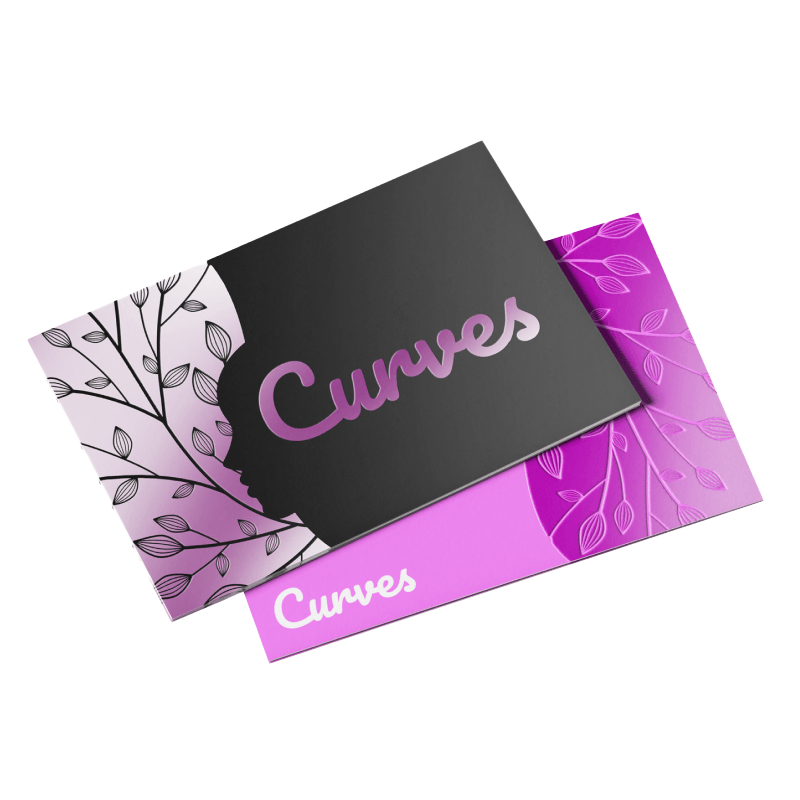
Spot UV (Raised) Postcards
Specialty Postcards
ITEM #
PC-SU19
DESCRIPTION
Make designs pop on your postcards with clear spot UV that brings out the colors of the design and adds emphasis to what matters most. These luxurious laminated postcards have clear gloss applied to areas of your choice. Our high quality 16pt stock is covered in lamination film to produce a premium 18pt postcard (silky matte). The smooth feel of our laminations combined with the slightly raised spot UV creates a powerful tactile experience through print.
Spot UV (Raised) Postcards
Stock High quality 16pt stock
Coating Matte lamination (18pt)
Colour Full color CMYK: 1 sided (4/0), or 2 sided (4/4)
Quantities Ranges from 500 to 2,500
Finishing Cut to size and box.
Spot UV (Raised) Postcards
Turnaround: 7-14 Business Days
Offsite Production
Spot UV (Raised) Postcards
ITEM #
PC-SU19
Specialty Postcards
DESCRIPTION
Whether you're looking for custom business apparel, personal attire, or unique team jerseys, the Everyday Cotton Tee from ATC™ is the perfect choice. With its comfortable fit and classic design, this tee is versatile enough to suit any occasion. Available in over 25 color options, it's sure to keep you comfortable and looking great all day long.
-
9.1-oz, 100% cotton
-
Tear away label
-
Minimal Shrinkage
-
Taped neck and shoulders
-
*90/10 cotton/polyester
-
**50/50 cotton/polyester
DESCRIPTION
Make designs pop on your postcards with clear spot UV that brings out the colors of the design and adds emphasis to what matters most. These luxurious laminated postcards have clear gloss applied to areas of your choice. Our high quality 16pt stock is covered in lamination film to produce a premium 18pt postcard (silky matte). The smooth feel of our laminations combined with the slightly raised spot UV creates a powerful tactile experience through print.
Spot UV (Raised) Postcards
Stock High quality 16pt stock
Coating Matte lamination (18pt)
Colour Full color CMYK: 1 sided (4/0), or 2 sided (4/4)
Quantities Ranges from 500 to 2,500
Finishing Cut to size and box.
Spot UV (Raised) Postcards
Turnaround: 7-14 Business Days
Offsite Production
EASY FILE SETUP GUIDE
For the best print results, it’s important that your files are set up correctly.
Please follow our file preparation guide to ensure everything is print-ready. If you have any questions or need help along the way, we’re always happy to assist.
Already have a design but aren’t sure how to prepare it for print? No problem — we can take care of that for you. We recommend submitting working files such as Adobe Illustrator (.AI) or print-ready PDFs whenever possible. Please note that files submitted as image formats (JPG, PNG, etc.) cannot be edited.
Need more than a quick setup? We also offer in-house professional graphic design services, from simple adjustments to full custom designs. Reach out anytime and we’ll help make sure your business cards print perfectly.
STEP 1
Check that the file matches the product's required dimensions. Make sure all images are embedded in the file and that all text is outlined.
STEP 2
Ensure that the artwork is created in CMYK color space with 1/16 inch (0.125") bleeds on all sides. For best results the artwork should be 300 dpi.
STEP 3
Export all files into PDF, Illustrator (.ai), or vector formats (.eps, .svg). Contact us if you have any questions or require additional support.
FILE PREP RESOURCES + DOWNLOADS
File orientation refers to how your artwork is laid out. Please ensure your files are set up with the correct orientation so they line up properly during printing and produce the intended result.

Setting Up Your Files The Right Way
-
Download our File Setup Templates as a guide to ensure a more optimal print result.
-
Be sure to DELETE any hidden layers that are not intended to print (ie: setup guide layers or other hidden artwork layers) to ensure no risk of them appearing on the final print.
-
Please submit each print job (ex. business card design front and back) as a single PDF file. Ensure that all pages are the same size.
-
Ensure your file(s) are submitted with proper orientation.
-
It is best to avoid using borders in your design. If a border is too close to the trim, the trim may be slightly off-center.
-
Files should consist of 1/8" (0.125") bleed and all important art and text must be within the safety margin. The more safety margin the better (to avoid awkwardly close trims or having critical elements from getting cut off).
-
Ensure that your PDF is high res and that all images are CMYK at 300 DPI.
-
Black text/type should have the following values: C0, M0, Y0, K100.
Larger areas of black coverage should be C:30/M:20/Y:20/K:100 to get a deep richer black. -
Embed or outline all fonts.
-
For best colour results, supply a CMYK only file (unless your product type specifically requires RGB color mode or specifically requires you to supply PMS colors).
-
CATEGORIES + TAGS